Mobile system design · 15 min
iOS system design interview: platform details that matter
What an iOS design round adds: background limits, background URLSession, storage, image pipelines and push, with a worked photo feed design.
Mobile system design · 17 min read
How a mobile system design round runs, the seven things a senior answer covers, a worked offline sync example, and how Senior and Staff are scored.

The mobile system design round looks like the backend one from a distance: a vague product prompt, a whiteboard, forty-five minutes. Up close it is a different interview. The backend version asks how the servers scale. The mobile version asks what happens on a phone that loses its network in a lift, gets killed by the operating system in the background, and has a user who expects their draft to still be there.
Candidates who prepared with backend system design material draw load balancers and sharded databases, and the interviewer waits for the part they came for. Mobile app system design is about the client: the device, its storage, its network and its lifecycle. This guide covers how the round is run, what a senior answer contains, a worked example, and how the same answer is scored differently at Senior and Staff.
The shape is consistent across most loops I have run and sat in:
| Minutes | What happens | What the interviewer is watching |
|---|---|---|
| 0 to 5 | The prompt: “Design a chat app”, “Design offline notes”, “Design the image feed” | Do you ask questions or start drawing? |
| 5 to 10 | Requirements and scope | Do you pick the hard part, or the easy one? |
| 10 to 30 | The client architecture and the data flow | Is there a single source of truth? Does data survive the process dying? |
| 30 to 40 | Deep dive the interviewer chooses | Depth on one component under a changed constraint |
| 40 to 45 | Your questions, trade-offs, what you would do next | Do you know what you left out? |
The deep dive in the middle is where the round is decided. The interviewer picks the weakest-looking part of your design and pushes on it. Your job in the first thirty minutes is to leave no part that is obviously weak.
A senior mobile design answer is organised around the device, not the server. These are the seven areas I expect to hear about, roughly in the order a good candidate raises them.
Security and privacy join the list when the product handles tokens, payments or personal data: where tokens are stored (Keychain on iOS, Keystore-backed storage on Android), certificate pinning and its operational cost, and what is encrypted at rest.
The prompt: “Design a notes app that works offline and syncs across a user’s devices.”
Ask first. The questions that change the design: Can two devices edit the same note at once? (Yes, assume a phone and a tablet.) Are notes shared between users? (Not in version one.) How large can a note be? (Text, up to a few hundred kilobytes; images later.) How fast must a change appear on the other device? (Within seconds when both are online.)
Stating what you are not designing is part of the answer: no collaboration between users, no rich media in version one.
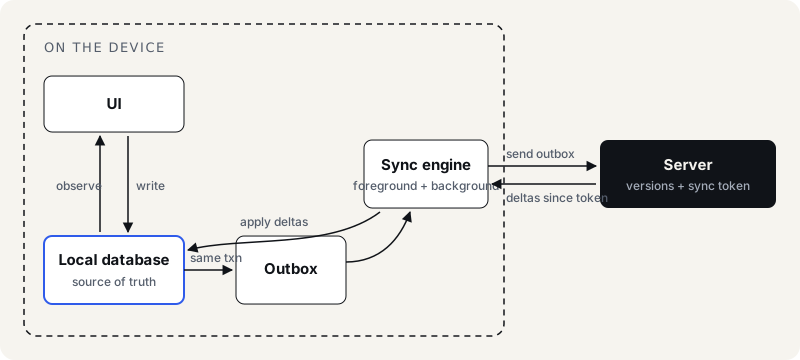
The same transaction for the write and the outbox row is the detail that matters. If they are separate, a crash between them leaves a note saved locally that never syncs, or an outbox entry for a note that does not exist.
This is where the interviewer goes next, always. “The user edits the same note on the phone and the tablet while both are offline. Both come online.”
Options, and what each costs:
| Strategy | How it works | Cost |
|---|---|---|
| Last writer wins | The later timestamp overwrites | Silent data loss; clocks on devices disagree |
| Version check, reject | Server rejects a write based on a stale version; client must merge | Correct, but you must design the merge and the UI for it |
| Keep both | On conflict, save the second as a copy (“Note (conflict)”) | No data loss, some user annoyance; simple to build |
| Field-level or CRDT merge | Merge edits character by character | Best experience, highest complexity; justified for real-time collaboration |
For version one of a personal notes app, “version check, keep both on conflict” is a defensible senior answer: no silent loss, small build cost, and a clear path to smarter merging later. Saying why you rejected last-writer-wins (device clocks and silent loss) scores more than choosing it correctly.
The user edits a note and switches apps. On iOS the app is suspended within seconds and may be terminated later without further notice; on Android the process can be killed in the background. Because every write is committed to the database immediately, nothing is lost; the outbox is sent on next launch or when a background task gets time. On iOS, BGAppRefreshTask and BGProcessingTask give the system permission to wake you, not a schedule. On Android, WorkManager with a network constraint is the standard answer.
Candidates lose points here by promising background sync “every five minutes”. Neither platform guarantees that, and saying so is part of the senior signal.
What you would measure: outbox depth per device (a growing outbox means sync is failing silently), sync failures by error type, conflict rate, time from write to server acknowledgement. What you would flag: the sync engine itself, so a bad release can fall back to a safer path without a new build.
The same prompt is used for both levels. What changes is what the interviewer writes down.
| Area | Senior answer | Staff answer |
|---|---|---|
| Scope | Designs the feature well | Asks what the feature is for and cuts scope to what matters |
| Architecture | Clean client architecture, single source of truth | The same, plus how it fits the rest of the app and other teams’ modules |
| Sync | A working sync design with conflict handling | Also the migration path: how existing users’ data moves to it |
| Trade-offs | Names the trade-offs when asked | Raises them unprompted and chooses with a reason |
| Operations | Mentions crash reporting | Rollout plan, kill switch, metrics that would trigger a rollback |
| Organisation | Not expected | Who owns the sync engine, how other teams adopt it, what the API contract with backend looks like |
One follow-up shows the gap faster than any other: “The backend drops a field. What happens to the app version from last spring?” A Senior answer says the client decodes it as optional. A Staff answer asks what the client then does with the missing value. A client that reads a missing trip status as “finished” has taken a decision only the server can make. I expect the change placed on three axes: which app versions are live right now and in what share, which component is allowed to decide the state that field describes, and who would see the breakage in production before support does. If no dashboard answers the third, the design is not finished.
A candidate interviewing at Staff who gives an excellent Senior answer is usually levelled at Senior. That is the most common outcome I see, and the fix is not more technical depth. It is the right-hand column. How I make that call, question by question, is in the Staff mobile system design interview.
These are the prompts that come up in mobile system design rounds, and what each one is really testing. The prompt names a product; the interviewer is listening for one or two platform problems underneath it.
| Prompt | What it is really testing | Where the round usually goes |
|---|---|---|
| “Design a chat app.” | Ordering, delivery states and offline send | Messages sent offline arrive out of order; the same message is sent twice after a retry |
| “Design the home feed.” | Pagination that survives inserts, and what the user sees offline | Cursor versus offset, and a cache that labels yesterday’s feed as yesterday’s |
| “Design an image loader for a scrolling list.” | Memory budgets, eviction and in-flight deduplication | Two cells ask for the same URL; memory warnings on older devices |
| “Design photo or video upload.” | Work that outlives the screen and the process | The app is killed mid-upload; a 40 MB file in front of a small form |
| “Design offline notes that sync across devices.” | Source of truth, the outbox, conflict rules | The same note edited on two devices while both are offline |
| “Design push notifications for this app.” | What push can and cannot guarantee | Push as a hint, not a delivery channel; catching up after the app was closed |
| “Design search with suggestions as you type.” | Stale responses and request volume | A slow result for an old query landing after a fast result for a new one |
| “Design a checkout or payment flow.” | Idempotency and state the user can trust | A timeout after the user tapped Pay: was it charged? |
| “Design a live location or delivery tracking screen.” | Real-time updates within battery and background limits | Foreground socket, background limits, and what the map shows on a bad network |
Every prompt above is answered with the seven areas earlier on this page. What changes is which one the interviewer picks for the deep dive, and the last column of the table tells you which to make strongest. Two scenarios the round often turns into have their own guides: offline-first sync and caching and the image loader.
Take four prompts (a feed, chat, offline notes, a photo upload flow), and for each one write the seven areas above on one page before looking at any solution. Then do the deep dive on yourself: pick the weakest of your seven and change a constraint. Platform-specific versions of the round are in iOS system design interview and Android system design interview.
Mobile system design · 15 min
What an iOS design round adds: background limits, background URLSession, storage, image pipelines and push, with a worked photo feed design.
Mobile system design · 15 min
What an Android design round adds: process death, WorkManager, Doze, FCM priority and Room as source of truth, with a worked chat design and its follow-ups.
iOS · 16 min
Twelve senior iOS interview questions for 2026: what each scores, a weak and a senior answer, and the follow-up on Swift 6 concurrency, SwiftUI, architecture.